Run a 1-Bit LLM on Your Mac with bitnet.cpp
You probably think running a real LLM locally on your Mac needs heavy GPU tooling, CUDA envy, or at least a pile of Metal shaders. Ten minutes from now, you’ll have a 3.3-billion-parameter model chatting on your laptop in under 1 GB of RAM, and the GPU stays completely idle.
That is what bitnet.cpp does on Apple Silicon. Microsoft’s inference framework for BitNet b1.58 leans on the trick we broke down in the explainer post : ternary weights replace matrix multiplications with integer additions. ARM cores eat that for breakfast. GPUs give it nothing extra.
This post is the hands-on companion. Every command, every real number, every gotcha, captured live on an M1 Pro.
Key Takeaways
- BitNet b1.58 3B runs on an M1 Pro at 22.5 tokens/s using only CPU, with 0/27 layers on GPU
- The entire model footprint: 873 MB on disk, ~1.3 GB in memory. Smaller than most browser tabs
- Adding efficiency cores at
-t 8on an 8-core M1 Pro halves throughput (classic Apple asymmetric-scheduling trap)- Five real gotchas: pyenv shadowing, an architecture the converter rejects, a base model parroting your prompt, and more
- Setup time end to end: under 15 minutes if you skip the traps this post flags
What You Will Need
Nothing exotic. Here is the minimum kit, with the versions I used:
- A Mac with Apple Silicon (M1, M2, M3, M4). I’m on an M1 Pro, 8-core variant
- Python 3.12+ (managed via pyenv here, though conda works too)
- CMake 3.22+. I used 4.2.1, installed via
brew install cmake - Xcode Command Line Tools via
xcode-select --install, which ships Apple clang 17 - Git with submodule support
- ~10 GB free disk. The full fp16 model downloads before quantization shrinks it
One thing to flag upfront: the bitnet.cpp README asks for Clang 18+. Apple clang’s version numbering diverges from upstream LLVM. Apple clang 17 is based on LLVM 19 internals, and CMake accepted it with no complaints in my run. If your build fails a clang version check on a different Xcode release, brew install llvm@18 is the escape hatch.
Clone the Repo and Set Up Python
bitnet.cpp vendors llama.cpp as a submodule, and the entire inference runtime sits inside 3rdparty/. Clone with --recursive or you’ll get a phantom error ten minutes into the build.
git clone --recursive https://github.com/microsoft/BitNet.git
cd BitNetNow the first trap. I pin Python 3.12 via pyenv because ML wheels (especially torch 2.2.x, which the requirements file pins) have spotty Python 3.13 support. The obvious move:
pyenv local 3.12.10
python -m venv .venv
source .venv/bin/activate
python --version # expect 3.12.10Except my python --version still reported 3.13.3. pyenv local writes a .python-version file, but PYENV_VERSION as an environment variable overrides it. I didn’t realize I had PYENV_VERSION=3.13.3 exported from an earlier shell session.
The symptom showed up ten commands later as a torch installation error. pip couldn’t find torch~=2.2.1 on Python 3.13 because that version’s wheels weren’t built for it. Fix: bypass the shim entirely and call the interpreter by its absolute path.
~/.pyenv/versions/3.12.10/bin/python -m venv .venv
source .venv/bin/activate
python --version  # really 3.12.10 now
pip install --upgrade pip
pip install -r requirements.txtTakes 2 to 5 minutes. Watch for a torch wheel with +cu in the name. On arm64 macOS you should get a pure CPU wheel. I ended up with torch 2.2.2, transformers 4.57.6, huggingface-hub 0.36.2.
Lesson for the post: python --version inside the venv, before you pip install anything. One line of caution saves five minutes of googling.
Build bitnet.cpp and Download a Model (in One Command)
setup_env.py bundles three jobs: download the model from Hugging Face, run CMake to build the C++ binaries, and quantize the weights to a CPU-friendly format. My first attempt, following the official example:
python setup_env.py -hr microsoft/BitNet-b1.58-2B-4T -q i2_sCMake compiled fine. Download succeeded. Then the conversion step crashed:
NotImplementedError: Architecture 'BitNetForCausalLM' not supported!Here is the gotcha most tutorials skip. The --hf-repo list in setup_env.py advertises microsoft/BitNet-b1.58-2B-4T as a valid option, but the vendored convert-hf-to-gguf-bitnet.py only registers LLaMAForCausalLM, LlamaForCausalLM, MistralForCausalLM, and MixtralForCausalLM. The official Microsoft 2B-4T model (released April 2025) uses a newer architecture string, BitNetForCausalLM, that the script predates. The older 1bitLLM/* series uses Llama-style naming, so the converter handles those.
The fix is to pick a compatible model. 1bitLLM/bitnet_b1_58-3B is a 3.3B-parameter BitNet b1.58 from the pre-Microsoft-official training run. Same architecture thesis, different (older) release train.
rm -rf models/BitNet-b1.58-2B-4T  # free ~1.5 GB
python setup_env.py -hr 1bitLLM/bitnet_b1_58-3B -q i2_sOutput after roughly 5 minutes:
INFO:root:Compiling the code using CMake.
INFO:root:Downloading model 1bitLLM/bitnet_b1_58-3B from HuggingFace to models/bitnet_b1_58-3B...
INFO:root:Converting HF model to GGUF format...
INFO:root:GGUF model saved at models/bitnet_b1_58-3B/ggml-model-i2_s.ggufThe quantized GGUF clocks in at 874 MB. That’s a 3.3B-parameter model squeezed to 2.20 bits per weight. i2_s is the native CPU format for x86 and ARM. The other CLI option, tl1, is an alternative CPU kernel layout. For Apple Silicon, i2_s is the right call.
Your First Inference Run
Moment of truth. The run_inference.py flags, pulled from --help (which corrected something in my notes: -p is the actual prompt text, not a token count):
python run_inference.py \
  -m models/bitnet_b1_58-3B/ggml-model-i2_s.gguf \
  -p "Explain ternary weights in one paragraph:" \
  -n 200 \
-t 4-n is tokens to generate, -t is thread count. I started with 4, matching what I thought were the M1 Pro’s performance cores. More on that in a minute.
The output streams, llama.cpp prints a stats footer at the end:
llama_perf_context_print:        load time =     251.20 ms
llama_perf_context_print: prompt eval time =     617.10 ms / 12 tokens  (51.43 ms/tok, 19.45 tok/s)
llama_perf_context_print:        eval time =   10041.44 ms / 199 runs   (50.46 ms/tok, 19.82 tok/s)
llama_perf_context_print: total time = 10670.45 ms / 211 tokens19.82 tokens per second. A 3.3B-parameter language model. On four CPU cores. With no GPU involvement. At this point a normal person would say “no GPU? really?” and open Activity Monitor.
Wait, Why Isn’t My GPU Being Used?
Because that is the whole point. Here is the damning line from the model load output:
llm_load_tensors: offloading 0 repeating layers to GPU
llm_load_tensors: offloaded 0/27 layers to GPU
llm_load_tensors: CPU buffer size = 873.66 MiBZero of twenty-seven layers went to the GPU. Every tensor, every matrix, every computation runs on CPU. The log also shows ggml_metal_init: found device: Apple M1 Pro earlier, which confused me at first. llama.cpp initializes the Metal backend by default on Apple Silicon; it just never offloads anything to it when the quantization format is CPU-targeted.
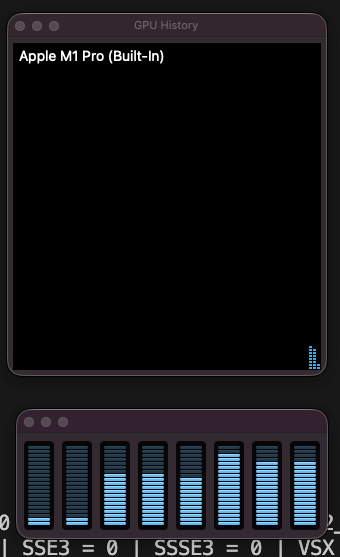
The i2_s quantization is specifically a CPU format. BitNet’s thesis, explained in detail in the explainer post on BitNet b1.58 , replaces matrix multiplications with integer additions on ternary weights. GPUs are built for parallel floating-point math. They hand you nothing extra when the operation is already addition. ARM NEON, by contrast, does packed 8-bit and 16-bit integer math at phenomenal energy efficiency per watt. BitNet was engineered around that.
For GPU execution of BitNet you need the TQ1_0 or TQ2_0 quantization formats (Vulkan backend), or a separate open-source project called 0xBitNet that implements custom WGSL compute kernels for the browser. Same model family, different silicon, different tradeoffs.
How Fast Can It Actually Go?
The M1 Pro has 8 logical cores, split asymmetrically: 6 performance cores and 2 efficiency cores on my 8-core variant. Threading a workload across both kinds rarely behaves how you’d expect. I ran the same prompt at -t 2, -t 4, -t 6, and -t 8 to map the scaling curve:
-t 6, collapse when efficiency cores join at -t 8.The shape is almost comical. From 2 threads to 6 threads, throughput more than doubles. That’s near-linear scaling across the performance cores. Then at 8 threads, adding the two efficiency cores, throughput halves.
Why the collapse? llama.cpp’s threadpool runs synchronous barriers between compute steps. Every step waits for the slowest worker to finish. Efficiency cores on Apple Silicon run at a fraction of the performance-core speed, roughly a quarter in power-saving modes. Two slow workers holding up six fast ones turns into a queue where the fast cores spend most of their time idle. More threads is worse than fewer when the threads have unequal throughput.
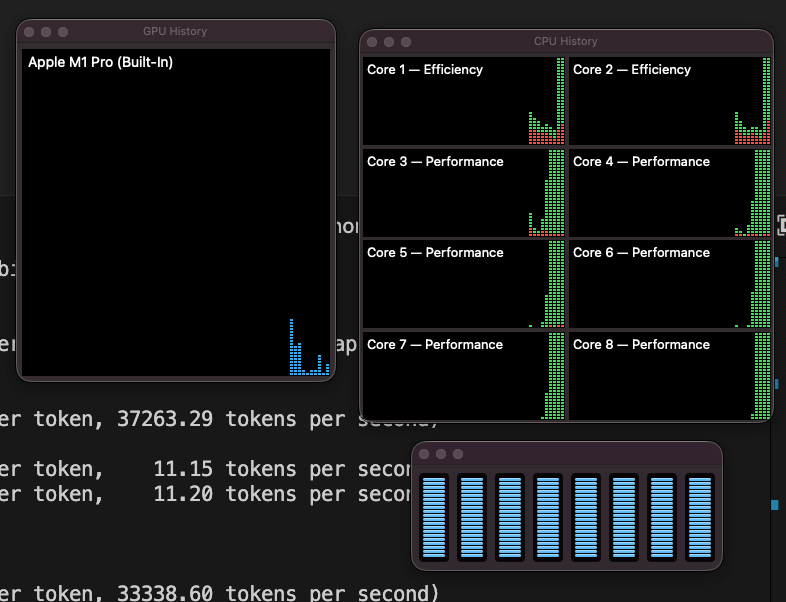
Sweet spot for the 8-core M1 Pro: -t 6. If you’re on a different chip, match thread count to your P-core count:
- M1 or M1 base (4P+4E):
-t 4 - M1 Pro 10-core (8P+2E):
-t 8 - M1 Max, M2 Pro with 8P+4E:
-t 8 - M3, M4 Max: match P-cores
Can I Actually Chat With It?
Sort of, and the journey there is instructive. run_inference.py has a -cnv flag for interactive chat. I tried it with the 3B model:
python run_inference.py \
  -m models/bitnet_b1_58-3B/ggml-model-i2_s.gguf \
  -p "You are a helpful assistant." \
-n 200 -t 6 -cnvAnd got this parade of nonsense:
> what is transurfing?
what is transurfing?
<|im_end|>
<|im_start|>user
what is transurfing?
<|im_end|>
<|im_start|>assistant
what is transurfing?Not a conversation. The model just echoed my question back, wrapped in chat-template markers, forever.
Two problems conspired. First, 1bitLLM/bitnet_b1_58-3B is a base model. No -Instruct suffix, trained on raw next-token prediction, no fine-tuning on conversation data. Second, -cnv auto-picked a ChatML template (<|im_start|>, <|im_end|>), but the model’s vocabulary contains none of those tokens. Only <s>, </s>, <unk>. When llama.cpp wrapped my input in those markers, the model treated them as novel character sequences and did the one thing it knows: continue the pattern it sees. Hence the infinite loop of “user says X, assistant says X.”
The fix: use an instruct-tuned BitNet model. The --hf-repo list includes TII’s Falcon3 series , which ship with proper chat-template metadata embedded in the GGUF:
python setup_env.py -hr tiiuae/Falcon3-1B-Instruct-1.58bit -q i2_s
python run_inference.py \
  -m models/Falcon3-1B-Instruct-1.58bit/ggml-model-i2_s.gguf \
  -p "You are a helpful assistant." \
-n 200 -t 6 -cnvThis time llama.cpp reads Falcon3’s embedded template (<|system|>, <|user|>, <|assistant|>, not ChatML) and actually works. Sample exchange, lightly edited:
> What is transurfing?
Transferring to a user's account is a way to make money by using a person's
identity and assets to make a transaction.

> No, tell me a joke.
Why don't we ever tell secrets on a farm? Because the potatoes have eyes,
the corn has ears, and the beans stalk.A 1-billion-parameter model with ternary weights on CPU. It nailed a classic joke, then cheerfully hallucinated a wire-fraud definition for a New-Age philosophy term. That is the honest picture: small, local, free, private, and confidently wrong when pushed outside its training. For a privacy-first assistant or an offline scratchpad, that tradeoff is often exactly what you want.
What to Try Next
A few threads to pull on once the basics work:
- Different thread counts for your chip. The chart above is M1 Pro 8-core specific. Run the same prompt across your P-core range and plot your own curve
- Bigger models.
HF1BitLLM/Llama3-8B-1.58-100B-tokensis the 8B variant, more capable but slower. See if the scaling trap at-t 8still applies or inverts - Other Falcon3 sizes (3B, 7B, 10B) for chat quality comparisons
- 0xBitNet in the browser. A separate open-source project runs the same model family on WebGPU instead of CPU, with zero installation
And if the ternary-weights mechanism still feels like magic, the BitNet b1.58 explainer unpacks why multiplications disappear, why adding zero to binary matters, and how an 8-bit integer scale factor is the only float left in the pipeline.
Troubleshooting
Quick reference for the five traps this tutorial hits, in the order they bite:
1. pyenv local doesn’t stick, and python --version reports the wrong version
PYENV_VERSION in your environment beats .python-version files. Either unset PYENV_VERSION or create the venv with ~/.pyenv/versions/<version>/bin/python -m venv .venv directly.
2. pip install -r requirements.txt errors with “No matching distribution for torch~=2.2.1”
Your venv is Python 3.13. torch 2.2.x has no 3.13 wheels. See #1.
3. NotImplementedError: Architecture 'BitNetForCausalLM' not supported!
You picked microsoft/BitNet-b1.58-2B-4T or a similar newer release. The vendored converter hasn’t been updated. Switch to 1bitLLM/bitnet_b1_58-3B or a Falcon3 variant.
4. Throughput drops when you add threads past the P-core count
Apple Silicon’s efficiency cores run much slower than the performance cores. llama.cpp waits on all workers, so the slowest hold back the rest. Cap threads at your P-core count.
5. Chat mode (-cnv) just repeats your question
You’re using a base model. Switch to an instruct-tuned variant (anything with -Instruct in the name).
Frequently Asked Questions
Does BitNet actually use the GPU on Apple Silicon?
No. With the i2_s quantization format (the default for CPU inference), zero layers get offloaded to Metal. The entire model and KV cache live in CPU memory, and every matrix operation runs on CPU threads. On my M1 Pro that was 0/27 layers for the 3B model and 0/19 for the 1B Falcon3. GPU execution of BitNet requires TQ1_0 or TQ2_0 formats with a Vulkan backend, or a WebGPU project like 0xBitNet. Neither is bitnet.cpp’s default path.
How much RAM does a 3B BitNet model actually need?
The quantized model itself is 874 MB on disk and loads into a CPU buffer of the same size. The KV cache adds 650 MB at 2048 context length (f16, not quantized in this setup). Total runtime footprint: roughly 1.5 GB. For comparison, an FP16 3B model would need around 6 GB just for weights. That’s a 4x memory reduction before accounting for the KV cache.
Can I run BitNet on an Intel Mac or an older M-series?
Intel Macs lack the ARM NEON and Apple Matrix coprocessor paths BitNet leans on. Inference will run but performance won’t match the numbers in this post. Any Apple Silicon chip (M1 through M4, including the base M1 with 4P+4E cores) works well, though thread-count sweet spots shift with the core layout. An M1 base delivers roughly half the tokens/s of my M1 Pro at the same thread count.
Why pick an older 1bitLLM model over the official Microsoft 2B-4T?
The bitnet.cpp conversion script doesn’t yet support the BitNetForCausalLM architecture string that Microsoft’s April 2025 release uses. The older 1bitLLM/bitnet_b1_58-3B uses Llama-architecture naming, which the script handles. You trade a slightly less polished model for a tutorial that actually completes. When the converter catches up, the official model becomes a drop-in swap.
Is bitnet.cpp a better fit than Ollama or LM Studio for local LLMs?
Different tools, different goals. Ollama and LM Studio are general-purpose local-LLM runners that abstract model selection and serving. bitnet.cpp is narrow: it runs BitNet-family models specifically, with the custom kernels the quantization needs. If you want to try BitNet on your Mac today, bitnet.cpp is the shortest path. For mixed-model exploration, Ollama is friendlier.
Closing
Ten minutes of setup (fifteen if you hit every gotcha in this post) gets you a real language model running on CPU in under 1 GB of RAM. No API keys, no network egress, no GPU busy-loop draining the battery. The engineering behind it (ternary weights turning multiplications into additions) is covered in the explainer .
If you ran the benchmark on a different Mac and got different numbers, I’d love to see the curve. Share your -t 2 / -t 4 / ... / -t N tokens/s values. The shape of the scaling cliff is chip-specific, and a community plot across M1/M2/M3/M4 would be genuinely useful reference material.