A File Doesn't Know What Kind of File It Is
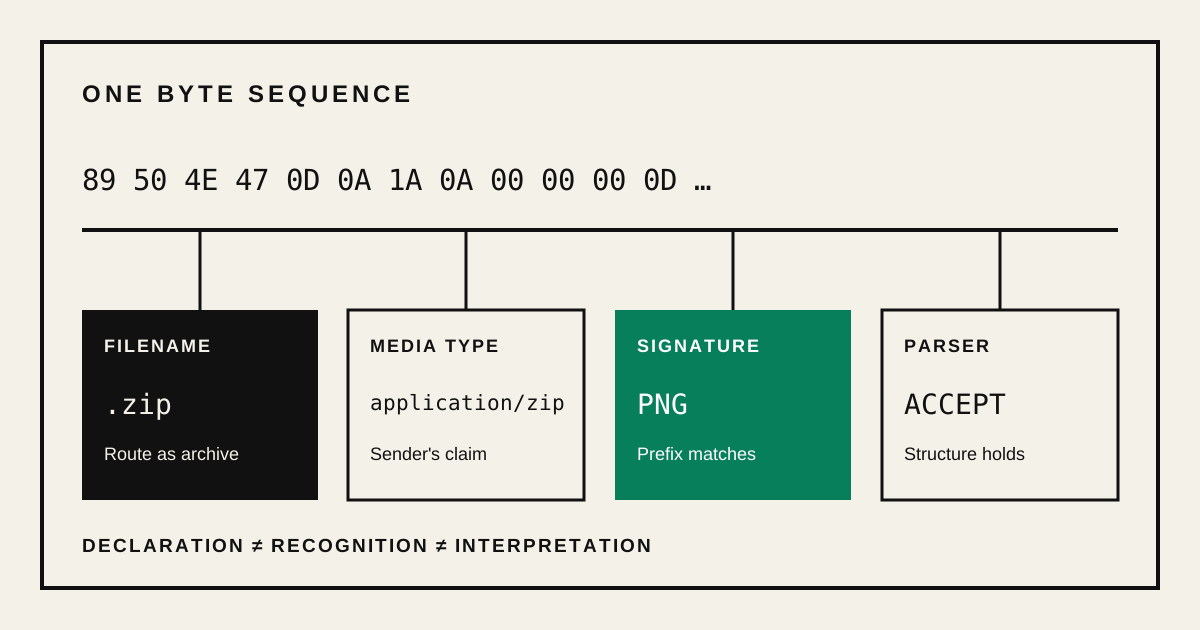
Take a JPEG named photo.jpg. Duplicate it, rename the copy to photo.zip, and compare the two files byte for byte.
Nothing inside changed. The first byte is still the first byte of the JPEG. The compressed image data is still where it was. The checksum is identical.
Yet the icon may change. Double-clicking may launch an archive utility instead of an image viewer. An upload form may accept one name and reject the other. One part of the system now behaves as if the file changed, even though the file’s contents did not.
That contradiction is the useful ambiguity behind the title. A file can contain strong evidence about its format, but it does not carry one universal field that every program must treat as its true identity.
A file type is a conclusion, not a universal property. Filename conventions, media types, magic bytes, format parsers, and applications inspect the same bytes for different decisions. The bytes constrain their answers, but no single observer replaces all the others.
The way out is to stop asking only what type is this file? and ask which observer made the claim, what it checked, and which decision comes next.
The laboratory below makes that separation observable. Its first view places a valid one-pixel Portable Network Graphics (PNG) image beside the exact same bytes given a .zip name and a conflicting media type. The second view adds an eight-byte file that contains only the PNG signature. You can also inspect a local file without uploading it.
Browser laboratory
File Identity Lab
Hold the bytes still, change their declarations, then inspect what a signature and a structural parser can actually establish.
LOCAL ONLY
Calculating the byte-for-byte comparison…
The MIME values above are deliberately supplied by this built-in experiment. They demonstrate conflicting declarations; they are not browser detection results.
| Built-in sample | Declared type | Signature | PNG structure |
|---|---|---|---|
one-pixel.png | image/png | PNG | Accepted |
one-pixel.zip | application/zip | PNG | Accepted |
png-header-only.png | image/png | PNG | Rejected |
Scope: this is a teaching instrument, not an antivirus scanner or universal file validator. It recognizes five common signatures and structurally checks only the PNG rules stated above.
In Compare rename, only the filename and supplied media type change. The initial bytes, hash, signature, and PNG parser result remain identical. In Inspect structure, the header-only sample starts like a PNG but cannot be decoded as one. Those are different claims, not confidence levels for one universal type.
What does a file extension actually tell you?
A file extension tells the surrounding system which behavior to try first. It is part of the filename, so renaming a file can change its routing signal without changing a single byte of its content.
Microsoft describes Windows file associations in exactly these terms: .jpg can select an image viewer, while .zip can select an archive utility. The freedesktop.org shared MIME database similarly keeps filename patterns beside rules that inspect content.
Reading a suffix is fast, requires no access to the file body, and usually matches the author’s intent. That makes extensions useful. It does not make the suffix a property of the bytes.
When we rename photo.jpg to photo.zip, we change the routing hint. We do not turn the JPEG grammar into the ZIP grammar. An archive utility can still try to parse the file and reject it. An image decoder that ignores the name can still display it.
The name therefore answers a practical question: which behavior should the surrounding system try first? It does not prove what structure the file contains.
Is a media type the real file type?
No. A media type declares the intended interpretation of data in a particular context. It can guide the receiver toward image/png or application/zip, but it does not prove that the bytes satisfy either format grammar.
The names are registered by the Internet Assigned Numbers Authority (IANA) , and the registration procedures are defined in Request for Comments (RFC) 6838 .
In Hypertext Transfer Protocol (HTTP), a server sends that declaration in the Content-Type header. RFC 9110 says the field describes both the data format and how the recipient is intended to process it within that message. This is metadata about a representation moving through a protocol. It is not a hidden byte embedded inside every file.
A local browser file has a related but narrower signal. The Web File API exposes File.type, which must be a lowercase parsable media type or an empty string when the user agent cannot determine one. The specification does not promise that the browser fully parsed the file to produce it. In practice, the result can depend on the browser, operating system and filename information available when the File object was created.
That is why the laboratory labels this value browser-supplied type, not detected format. For the built-in renamed sample, the conflicting value is supplied deliberately so that the disagreement remains reproducible on every device.
The distinction matters at upload boundaries. If a client says image/png, it has made a claim. A server can use the claim for routing, but it should not treat user-controlled metadata as proof that a decoder will see a safe image.
Can magic bytes identify a file?
Magic bytes can establish that selected bytes match a known file-signature rule. They cannot establish that the complete input is valid, safe, or accepted by every parser for that format.
A PNG datastream, for example, starts with these eight bytes:
89 50 4E 47 0D 0A 1A 0AThe current PNG specification explains why the sequence exists. It distinguishes PNG from other datastreams and catches several common transfer errors. The Unix file utility and its libmagic library generalize this idea through a database of byte patterns and structural tests.
Signature matching therefore answers a narrower question: does this input begin like a format I recognize?
The signature is followed by chunks. A conforming PNG begins with an IHDR header chunk, contains image data in one or more IDAT chunks, and ends with IEND. Each chunk also carries a cyclic redundancy check (CRC) over its type and data. That structure also contains the filtered and compressed stream explored in how PNG compression preserves every sample .
Eight correct bytes followed by nothing satisfy the signature test and fail the format grammar.
That is what the third laboratory sample demonstrates. Calling it “PNG detected” without qualification would turn a prefix match into a claim about the entire file.
A parser checks the whole format grammar
A parser makes a stronger claim by checking relationships across the input against one format grammar. Its verdict is still scoped: it establishes what that parser checked, not a universal identity that every other program must adopt.
For PNG, that means reading chunk lengths without stepping beyond the available bytes, enforcing the order of critical chunks, checking required fields, validating CRC values and reaching a valid IEND. For ZIP, PDF or an EPUB publication, the relevant structures and constraints are different. There is no universal “parse file” operation detached from a format grammar.
This gives us another separation:
| Layer | What it observes | What it can establish |
|---|---|---|
| Filename | A suffix such as .png | A naming convention or application route |
| Declared media type | Metadata such as image/png | The sender’s intended interpretation in this context |
| Signature match | Selected bytes at known offsets | Compatibility with a recognition rule |
| Structural validation | Relationships across the input | Conformance to the checks that were actually implemented |
| Application behavior | One concrete parser and its surrounding code | What that program accepts and does |
The last two rows are deliberately not identical.
A specification describes a language of valid byte sequences. A parser is an implementation that attempts to recognize or consume that language. Real parsers can support only part of a specification, add extensions, recover damaged inputs, ignore trailing data, impose resource limits or contain bugs. Two programs can therefore receive the same bytes and disagree without either program having “changed” the file.
Sometimes one parser is stricter. Sometimes one is more forgiving. Sometimes they are answering different questions: a thumbnailer may decode the first image it can recover, while an archival validator may reject the same input because one checksum is wrong.
“It opens” is evidence about one application. It is not a proof of universal conformance.
How can one file satisfy two format grammars?
A polyglot file is one byte sequence accepted under two or more format interpretations. It works because the bytes satisfy multiple sets of constraints at once, not because parsers are free to invent arbitrary meanings.
Up to this point, every mismatch could be explained by a wrong label or an incomplete test. Polyglots introduce the stronger case.
This is possible because format grammars leave different kinds of room. One format may allow comments or ignored fields. Another may locate important structures from the end of the file. A parser may skip bytes that another parser treats as meaningful. If the constraints can coexist, the resulting bytes belong to the intersection of two accepted languages.
The 2013 paper Polyglots: Crossing Origins by Crossing Formats examined how these multiple interpretations could cross security boundaries on the web. More recent research, On the Abuse and Detection of Polyglot Files , studied real attack chains and found that format-identification tools could miss polyglots used in the wild.
There is an important limit here. A file that one tolerant program partially recovers and another program rejects is not automatically a formal polyglot. Neither is a file merely because a text editor can display its bytes. The meaningful claim is that two relevant parsers accept the same input under two format interpretations.
The laboratory does not generate or distribute a polyglot. We do not need one to establish the article’s central distinction, and a reusable polyglot builder would add risk without adding much understanding.
This is different from hiding a website in PNG color samples . That experiment adds another interpretation after ordinary image decoding; it does not claim that the PNG file itself also satisfies a second file-format grammar.
When does file-type ambiguity become dangerous?
File-type ambiguity becomes dangerous only when one stage approves an input under one interpretation and a later stage grants capabilities under another. A mismatched extension, a signature match, a malformed file, or even a polyglot is not a vulnerability by itself.
Imagine an upload pipeline:
- the gate checks the extension and allows images;
- a scanner sees a PNG signature and routes the file to an image-only rule set;
- the server later publishes the original bytes with a scriptable media type;
- a browser or another consumer interprets active content that the first two stages never examined.
The dangerous property is not merely “two types.” It is validation under one grammar followed by use under a more powerful grammar.
Authority handoff
The bytes stay. The authority changes.
Compare what each gate establishes with what the downstream consumer is later allowed to do.
Interpretation gap
The consumer can enable behavior the gate never validated.
Aligned grammar
Validation and use ask compatible questions about the input.
Decode and re-encode
Re-encoding narrows what survives, although serving context and encoder behavior still matter.
This is a boundary model, not an exploit simulator. A disagreement becomes a vulnerability only when the later interpretation creates a capability an attacker can use.
The first path isolates that authority change. The other two show the difference between keeping the grammar aligned and narrowing the input by decoding and re-encoding it. Neither response is a universal guarantee; all three make the handoff explicit.
Modern systems reduce this gap in layers. They allowlist expected media types, parse with a format-specific decoder, reject unexpected structures, re-encode media when preservation of the original bytes is unnecessary, serve untrusted files from isolated origins, use download-oriented disposition when appropriate, and send accurate Content-Type metadata. On the web, X-Content-Type-Options: nosniff tells the browser to enforce the declared type for destinations where the Fetch standard applies that check.
No single check replaces the others because the checks protect different transitions. Renaming a file does not rewrite its grammar. Matching magic bytes does not validate the body. Successfully decoding an image does not prove that preserving every original byte is safe for every later consumer.
The same boundary appears outside file formats. In Node.js,
execSync()andexecFileSync()differ over whether text reaches a shell parser . The subject changes, but the security question survives: which interpreter receives authority after validation, and what new meaning can it assign?
The file type was the wrong object
Return to photo.zip.
Its bytes still conform to whatever JPEG structure they conformed to before the rename. Its new suffix now suggests ZIP. A desktop shell can route it to an archive utility. A browser can attach a media type derived from the information available to it. A signature detector can recognize JPEG. A JPEG decoder may accept it. A ZIP parser should reject it unless the bytes also satisfy ZIP’s rules.
Which answer is the file’s identity?
There is no universal file-type answer that replaces all the others. Each answer belongs to a relationship:
- a name and a naming convention;
- a message and its declared media type;
- a byte sequence and a recognition rule;
- a byte sequence and a format grammar;
- an input and a concrete parser;
- a parsed result and the behavior an application permits.
The file does not need to know what it is. The system needs to state what it observed, which grammar it checked, and what it plans to do next.
That is a less convenient answer than one type label. It is also the answer that survives a rename.